
4. Export a .cws shard
A CrystalWorkshop Shard (.cws) is the file players install. It stores your changes as patches against each player’s own game files, so it carries no copy of the game’s data.
-
Choose Export… (on the Changes page or in the top bar). The Export changes dialog plans what will be written. It never writes until you confirm.
-
Choose Shard (.cws). The other choice, Loose files (mod_data), writes the changed files straight into the game’s
mod_datafolder for your own quick tests, with backups. -
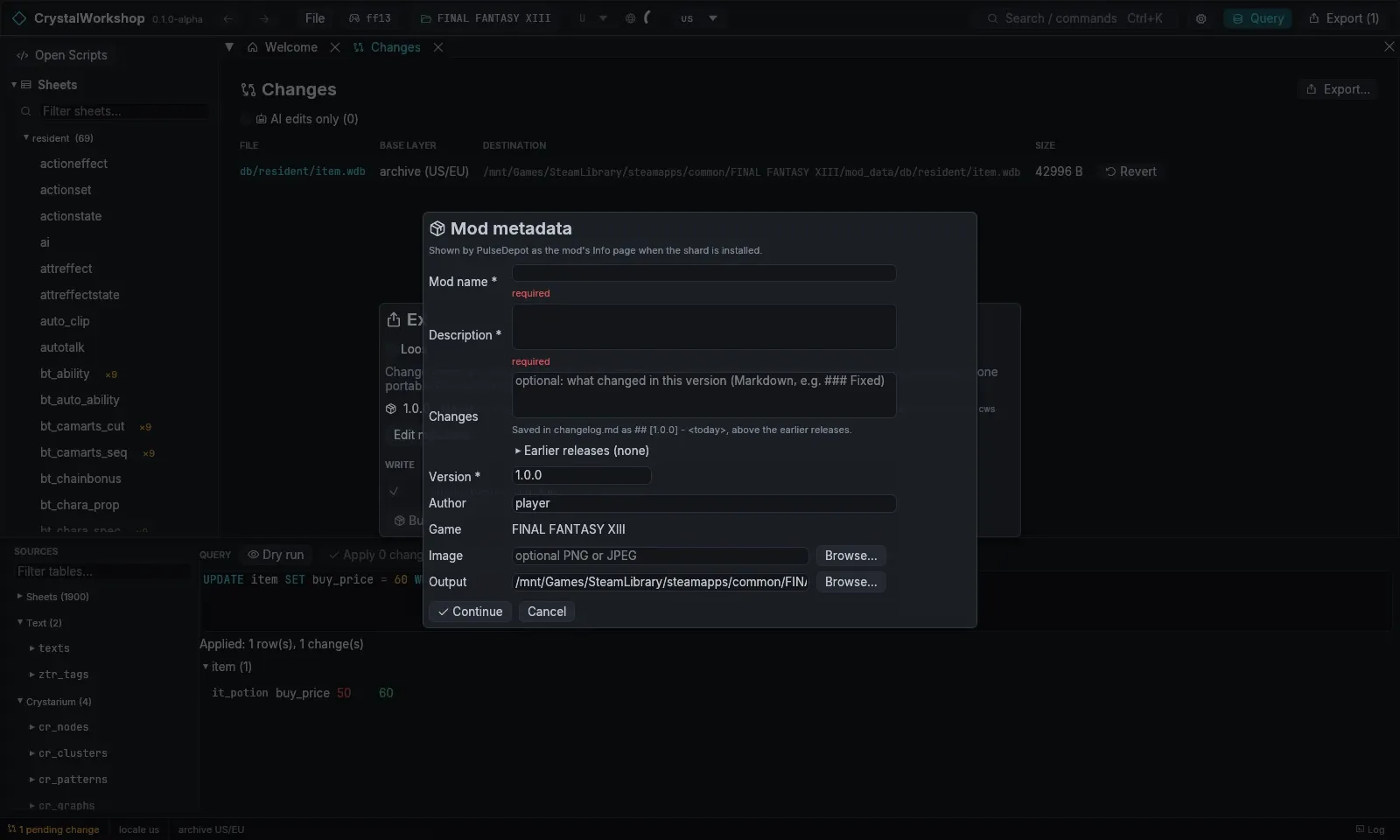
Fill in the Mod metadata form. It opens the first time; Edit metadata… reopens it.
- Mod name and Description are required, for example Cheaper Potions and Potions cost 60 gil in every shop.
- Changes is this version’s changelog entry in Markdown, for example
### Changedand a list. - Version is required and must be semver, for example
1.0.0. - Author, Game (read-only) and an optional Image are shown on PulseDepot’s details page.
- Output defaults to
<game>/ff13_studio/exports/<name>.cws.
-
Choose Continue, then Build shard (1 files). CrystalWorkshop builds the shard, verifies it and writes it. Rows marked Unverified (routes not proven in game, which includes all of XIII-2 and LR) need allow ticked to be included.
Result: your shard is in ff13_studio/exports/. Your changes stay pending, so you can keep working and export again with a higher version.
More detail: Mod export reference. Next: 5. Install and test it.