
5. Review and apply
Goal: your enabled mods are merged into one Crux image (active.crximg) and installed, together with Crux.
-
Close the game.
-
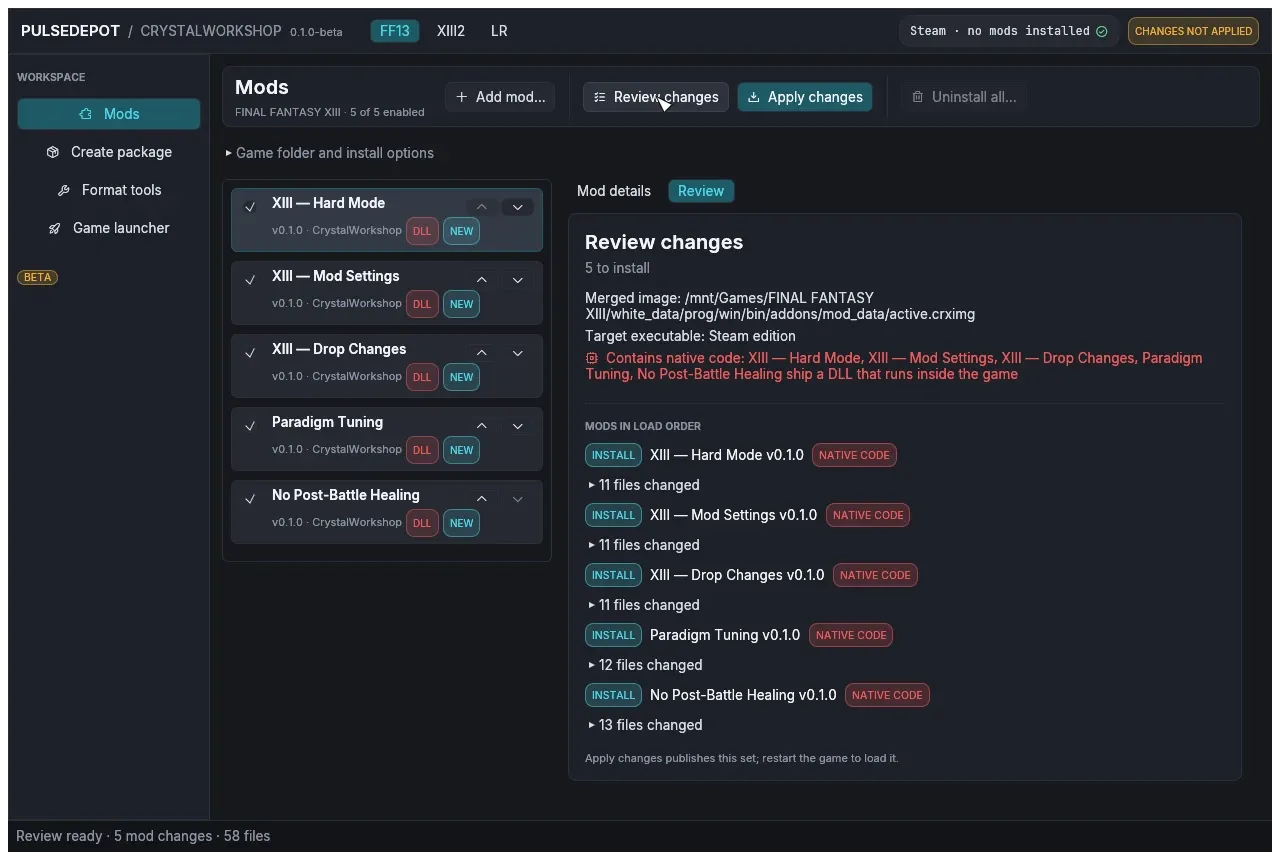
Choose Review changes. PulseDepot builds the merged image from every enabled mod and shows what Apply will do. It writes nothing yet. The review shows:
- how many mods it will install, update, downgrade, rebuild or remove;
- where the merged image goes and which game executable it targets;
- any memory patches and native code;
- each mod’s changed files, the conflicts and any Crystarium merge.
-
Choose Apply changes. Apply checks again that nothing changed since the review, then installs the set. The status line reports, for example:
- “NovaFix found.” or “NovaFix not found.”;
- “Installed Crux as …\Crux.dll (SHA-256 verified).” or “Crux is up to date”;
- “Applied: N mod(s) installed. Restart the game to load the new set.”
-
Start the game. See Launch the game. Restart the game after every Apply.
What Apply writes
Section titled “What Apply writes”-
The merged image
active.crximggoes in Crux’s mod folder:modRootfromCrux.ini, if one is set;- otherwise
addons/mod_databeside the game executable, if that folder exists; - otherwise
<game folder>/mod_data.
-
PulseDepot’s own state goes in
<game folder>/ff13_studio/nova/<game>/: the installed mod list (bundle.json), the installed mods and backups of any image PulseDepot did not make. -
Crux is installed as one of:
Crux.dllin the NovaFixaddonsfolder. For XIII:white_data\prog\win\bin\addons\; for XIII-2:alba_data\prog\win\bin\addons\.version.dllbeside the game executable. For XIII:white_data\prog\win\bin\; for XIII-2:alba_data\prog\win\bin\; for LR: the game folder.
Installing one build removes the other, so only one Crux runs.
-
Saves are never read or written. A mod’s settings live in Crux’s host storage (
mod-state.datin the mod folder), kept per save slot.
When Apply refuses
Section titled “When Apply refuses”Apply stops before writing anything in these cases:
| Message | What to do |
|---|---|
| “Crux not installed: … does not match … extract the whole PulseDepot zip again.” | A Crux DLL beside PulseDepot is missing or altered. Extract the package again. |
| “… version.dll belongs to another program (it is not Crux).” | Another tool, such as an ASI loader, owns version.dll. PulseDepot never replaces it. Remove that file yourself, or choose NovaFix addon (Crux.dll) under Crux host. |
| “installed mod set changed since review; review again” | The installed set changed since you reviewed. Review again. |
Next: 6. Launch the game.