
Complete guide
PulseDepot is the mod manager for the FINAL FANTASY XIII trilogy on PC (Steam). It installs mods made with CrystalWorkshop and older Nova Chrysalia mod packages without editing your game archives or your save files.
Full guide and documentation: CrystalWorkshop site (PulseDepot guides, Changelog, Report a problem).
How it fits together
Section titled “How it fits together”CrystalWorkshop ──makes──▶ shards (.cws)PulseDepot ──merges──▶ every enabled mod into one image: mod_data/active.crximgCrux ──loads───▶ that image inside the game (a small DLL PulseDepot installs)-
A shard (
.cws) is a CrystalWorkshop mod. It stores the mod’s changes as differences from your own game files, plus optional native code (“units”) that Crux loads. -
PulseDepot keeps your mod list, checks it, and merges every enabled mod into one Crux image,
active.crximg. -
Crux is the mod host the game loads. It serves the image’s files to the game while it runs and loads the mods’ units. It ships in two builds:
Crux.dll, a NovaFix addon;version.dll, standalone, for games without NovaFix.
PulseDepot picks the right build and installs it when you apply.
Contents of the package
Section titled “Contents of the package”| File | What it is |
|---|---|
pulsedepot.exe / pulsedepot |
PulseDepot (64-bit Windows / x86_64 Linux). |
Crux/Crux.dll |
Crux as a NovaFix addon (32-bit, loaded by the game). |
Crux/version.dll |
Crux standalone (32-bit). It forwards every Windows version.dll call to the system copy. |
Crux/CRUX-MANIFEST.json |
Size and SHA-256 of both Crux builds. PulseDepot checks them before it installs one. |
Crux/CRUX-BUILD.json |
Build details of both Crux builds. |
Crux/Crux.ini.example |
Starting Crux settings for a new setup. |
support/ff13-studio/tools/vineflower-1.12.0.jar |
The Vineflower 1.12.0 Java decompiler, used to merge script mods. Nothing to download. |
Start-PulseDepot.cmd, Check-Java.cmd (Windows) / start-pulsedepot.sh, check-java.sh (Linux) |
Start PulseDepot with JAVA_HOME’s JDK, or show the Java it will use. |
README-Windows.txt / README-Linux.txt |
A short version of this guide. |
docs/ |
This guide and its screenshots. |
LICENSE, THIRD-PARTY-NOTICES.txt, licenses/ |
The licence and the third-party notices (see Licences). |
BUILD-INFO.json |
Build details, file hashes, and what was and was not tested. |
Requirements
Section titled “Requirements”- The Steam release of FINAL FANTASY XIII and/or XIII-2. LIGHTNING RETURNS is in the game list, but no LR mods ship with this release. Treat LR support as experimental.
- Microsoft Store versions: only XIII-2, and only as an experiment: PulseDepot cannot start Store games yet. See Compatibility.
- Windows: 64-bit Windows 10 or 11 with Direct3D 12 or Vulkan drivers.
- Linux: x86_64 with a Vulkan or OpenGL driver. The games run through Steam Play (Proton).
- NovaFix is optional. With NovaFix, Crux runs as its addon. Without it,
Crux runs as
version.dllbeside the game executable. - Mods that change game scripts only: a 64-bit JDK 17 or newer (
javaandjavac, not just a Java runtime). No Java is bundled. See Script mods and Java.
Install on Windows
Section titled “Install on Windows”- Extract
pulsedepot-0.1.0-beta-windows-x86_64.zipto a folder you can write to, for exampleC:\Games\PulseDepot. Do not useProgram Files. Keep the whole folder together: PulseDepot refuses to apply withoutCrux\. - Optional: check the zip against
SHA256SUMS.txt(PowerShell:Get-FileHash .\pulsedepot-0.1.0-beta-windows-x86_64.zip). - Start
pulsedepot.exe. The build is not code-signed, so SmartScreen may say “Windows protected your PC”. Choose More info, check that the file ispulsedepot.exefrom this folder, then choose Run anyway. - For script mods, install a JDK 17 or newer, for example the Eclipse
Temurin JDK 17 (or 21) MSI from adoptium.net with Set JAVA_HOME
variable and Add to PATH turned on. Then start PulseDepot with
Start-PulseDepot.cmd, which puts%JAVA_HOME%\binfirst onPATH. RunCheck-Java.cmdto see the versions found.
Install on Linux (Steam / Proton)
Section titled “Install on Linux (Steam / Proton)”-
Extract
pulsedepot-0.1.0-beta-linux-x86_64.zipanywhere you can write, for example~/Games/PulseDepot, withunzip pulsedepot-0.1.0-beta-linux-x86_64.zip(or any archive manager that keeps file permissions). Start./pulsedepotor./start-pulsedepot.sh. If it won’t start, runchmod +x pulsedepot start-pulsedepot.sh check-java.shin the extracted folder. (No AppImage is built for this release.) -
PulseDepot finds Steam libraries in these places, reading every library listed in each one’s
libraryfolders.vdf:~/.steam/steam~/.steam/root~/.local/share/Steam- the Flatpak Steam folder
FF13_GAME_DIR,FF13_2_GAME_DIRandLR_GAME_DIRoverride detection. -
Standalone Crux (no NovaFix): set the game’s Steam launch options once, in Properties > General > Launch options:
WINEDLLOVERRIDES="version=n,b" %command%Without this override, Proton uses Wine’s own
version.dlland Crux never loads. -
With NovaFix (Crux as
addons/Crux.dll), keep whatever NovaFix itself needs. Crux adds no requirement. -
For script mods, install a JDK 17 or newer from your distribution, for example Arch
jdk17-openjdkorjdk21-openjdk, Debian/Ubuntuopenjdk-17-jdk, Fedorajava-17-openjdk-devel. Run./check-java.shto see the versions found.
PulseDepot writes only into the game folder (see What Apply writes). It never touches the Proton prefix or your saves.
First start: choose the game and its folder
Section titled “First start: choose the game and its folder”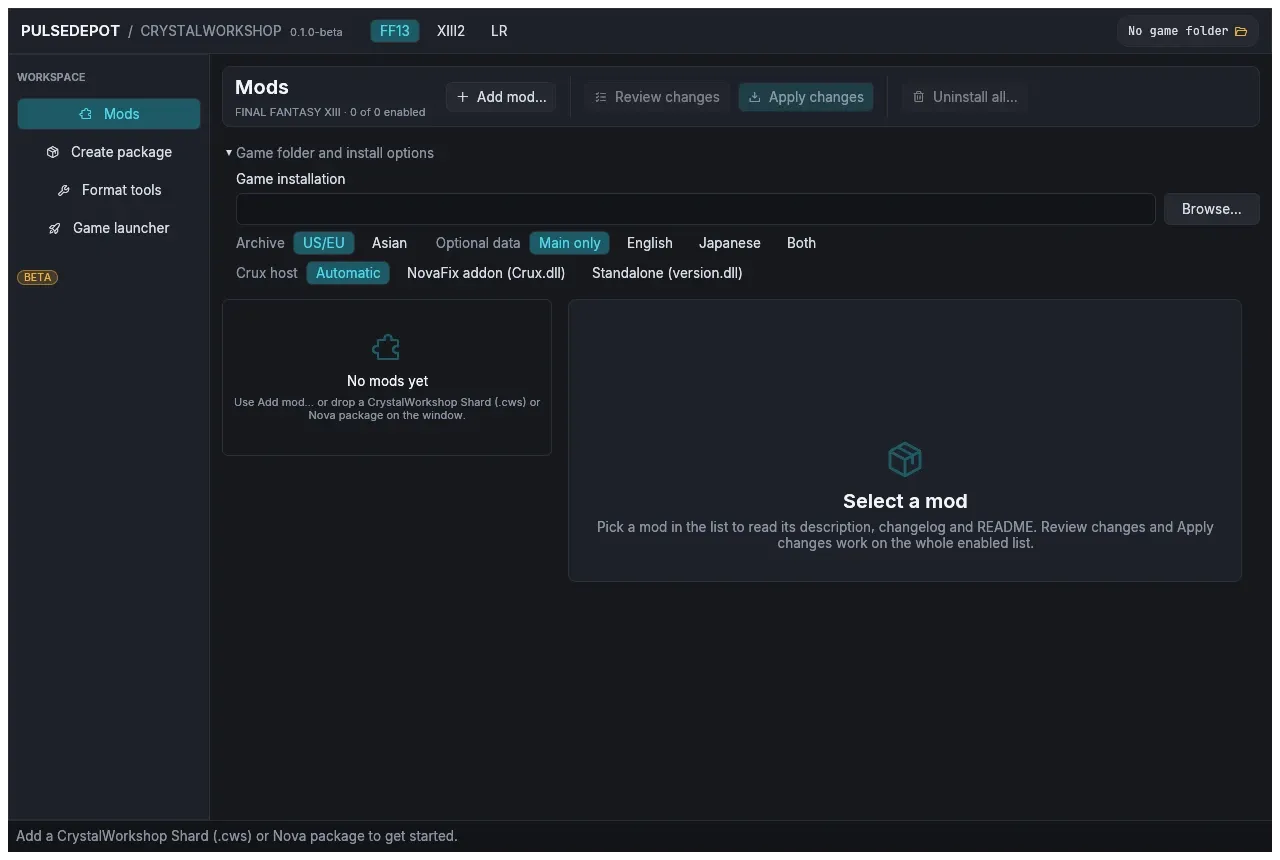
- Pick the game with the FF13 / XIII2 / LR tabs at the top. Each game keeps its own folder, mod list and launcher options.
- If the game was found, the header shows
Steam · no mods installed. Otherwise open Game folder and install options and choose Browse…. Pick the folder that containswhite_data(XIII),alba_data(XIII-2) or the LR game files.
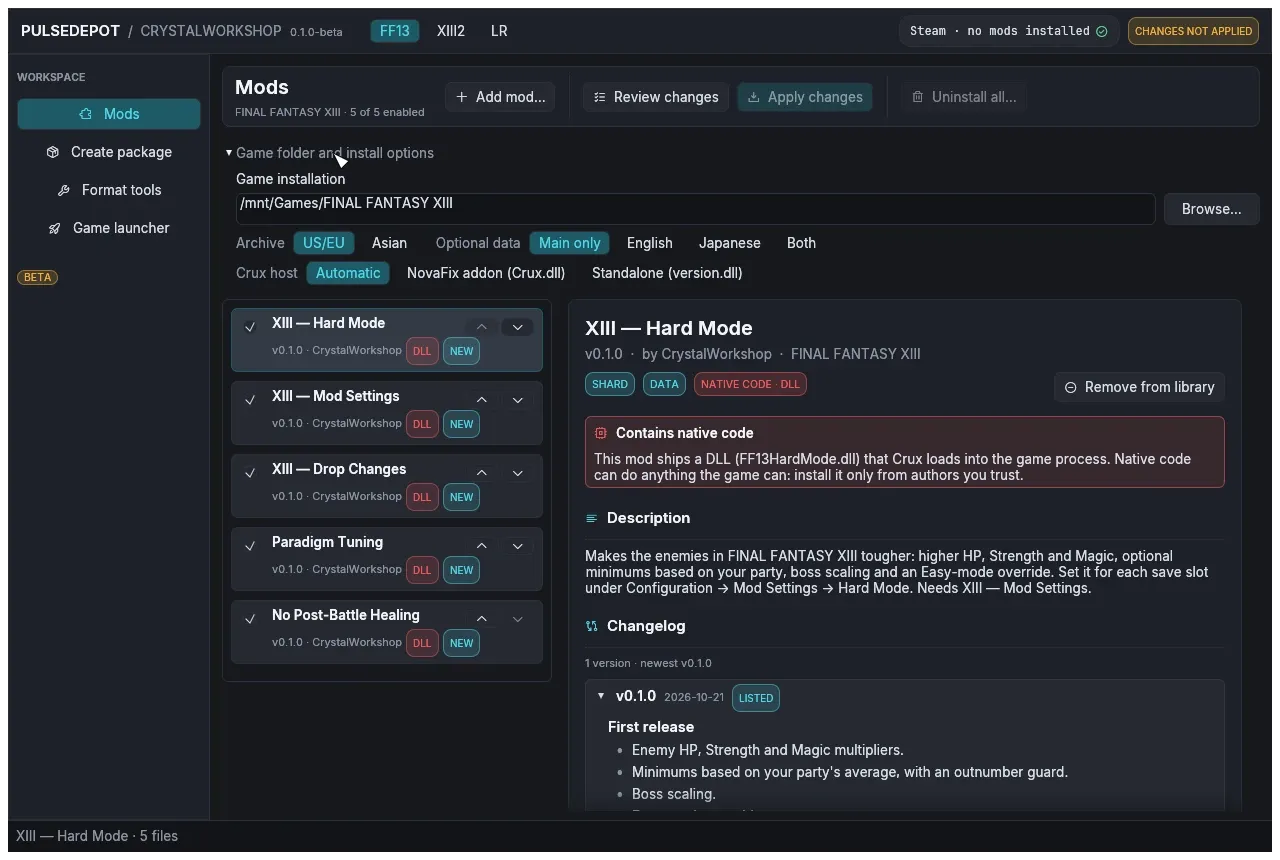
| Option | What it does |
|---|---|
| Archive | US/EU or Asian archives (LR: English or Japanese voice). Use the one your game runs. |
| Optional data | Install a mod’s English or Japanese voice/text data as well. |
| Crux host | Automatic (the default): the NovaFix addon when NovaFix is installed (d3d9.dll and NovaFix.ini beside the game executable; that d3d9.dll is NovaFix’s, and PulseDepot never ships or changes it), otherwise standalone version.dll. NovaFix addon (Crux.dll) and Standalone (version.dll) force one build. |
Adding mods
Section titled “Adding mods”Use Add mod…, or drop files onto the window. PulseDepot copies each file into its own library, so the file you added can be moved or deleted afterwards.
| File | What it is |
|---|---|
CrystalWorkshop Shard (.cws) |
A mod built by CrystalWorkshop: changes stored as differences from your game files, plus optional native code. Older shards with the .bin extension also load. |
Nova Chrysalia package (.ncmp, or .zip) |
An older mod package made for the Nova Chrysalia mod manager: a ZIP with a modconfig.ini ([ModPackConfig] Name / Author / Version / Summary / GameEntry, and [NovaChysaliaConfig] DataPatch / ENPatch / JPPatch / CodePatch / ExtPatch flags) and Data/, EN-Data/, JP-Data/, Code/*.nccp or External/ folders. PulseDepot compares the package with your original game files when it reviews, and merges it like a shard. It never runs that mod manager’s own installer. |
Packages that need an external setup (ExtPatch) cannot join the merged
list. Install them alone from their details panel (“External setup (this
package only)”). On Linux this runs the package’s setup through a Wine
executable you choose.
Adding a newer version of a listed mod replaces the old one in place. Adding an older version asks first:
- Downgrade to vX puts the older file in place. The prompt lists the releases it rolls back.
- Keep vY keeps what you have.
Adding the same version with different contents asks whether to replace the listed file.
Mod details
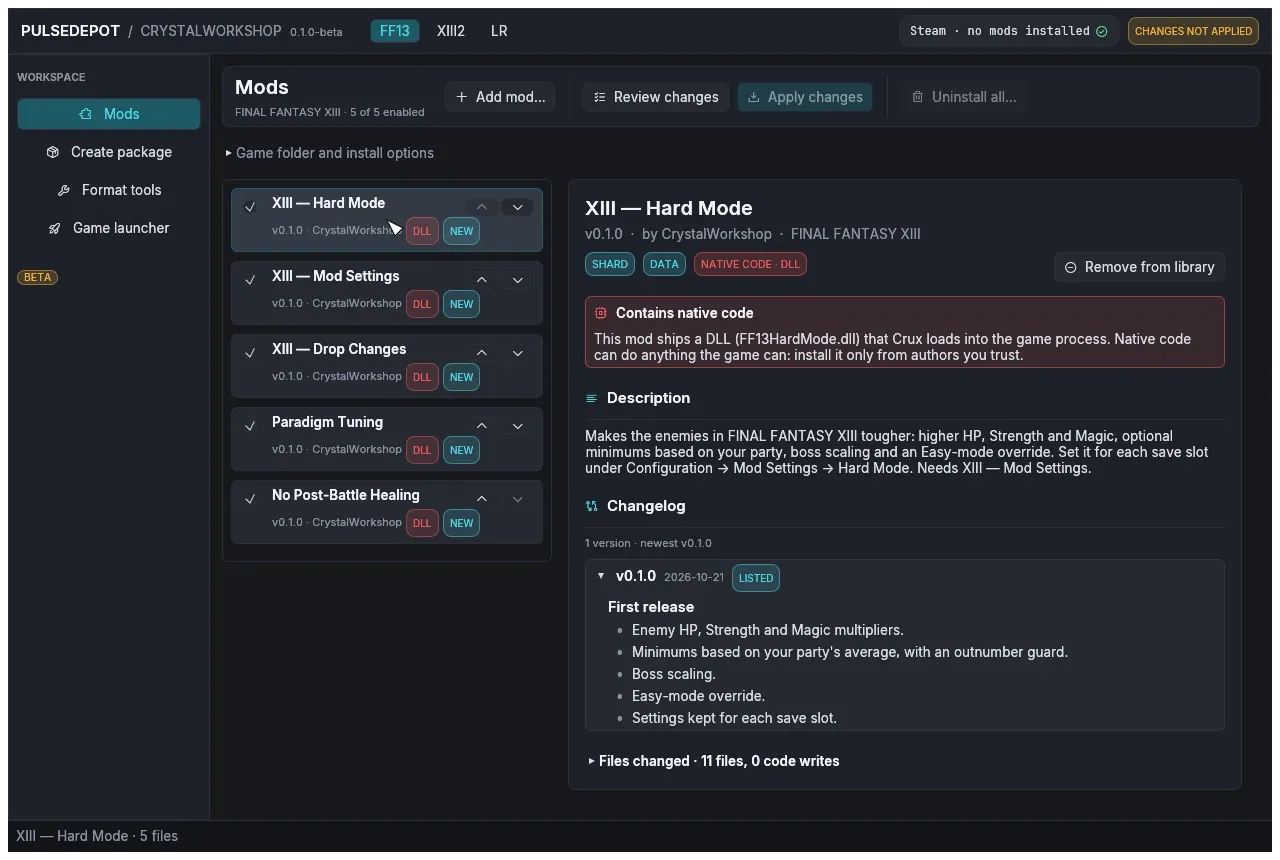
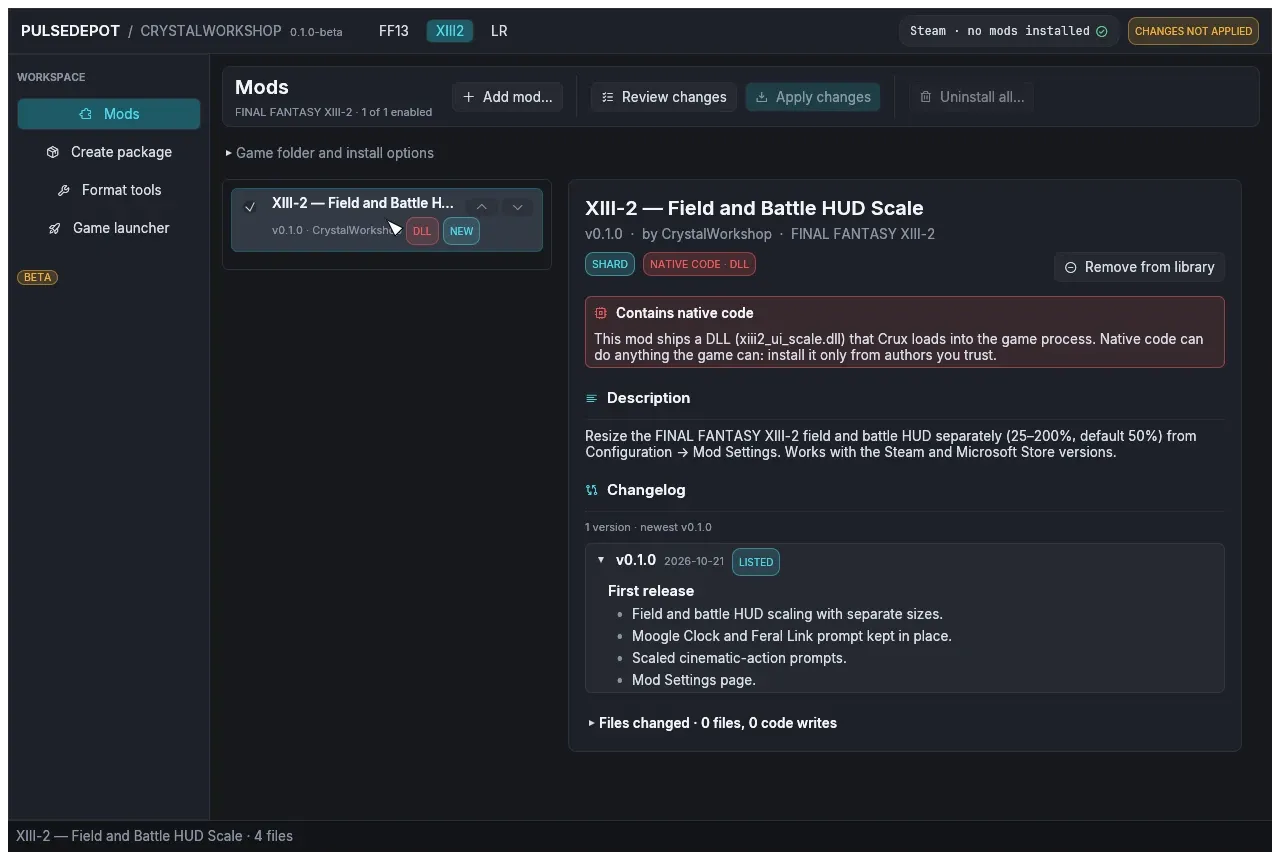
Section titled “Mod details”Select a mod to read its details:
- version, author and game;
- badges:
- SHARD or NOVA PACKAGE;
- DATA, EN, JP;
- CODE · Crux;
- NATIVE CODE · DLL;
- description, changelog and README;
- the files it changes;
- any conflicts.
A mod that ships native code shows a red notice. A unit runs inside the game process and can do anything the game can. Install such mods only from authors you trust.
Enabling, ordering and conflicts
Section titled “Enabling, ordering and conflicts”-
Enable / disable: the checkbox on each row. Disabled mods stay in the list. If one is installed, Apply removes it.
-
Order: ▲ loads a mod earlier, ▼ loads it later. Later mods win conflicts. Drag-and-drop reordering is not supported.
-
Row badges:
Badge Meaning NEW Apply installs it. INSTALLED Already installed. UPDATE Apply installs a newer version. DOWNGRADE Apply installs an older version. REMOVE Installed but disabled; Apply removes it. CONFLICT Another enabled mod changes the same file. DLL The mod ships native code. SETUP The package needs its external setup. -
How conflicts are resolved:
- A file that only one mod changes is used as is.
- Text (
.ztr), database (.wdb) and WPD packs that several mods change are merged entry by entry against the original file. The later mod wins each entry both change. - For any other file type, the whole file comes from the latest mod in the list.
- Game scripts: see Script mods and Java.
- The details pane and the review list each conflict as “subject: winner overrides others”.
Script mods and Java
Section titled “Script mods and Java”A JDK 17 or newer (java and javac) is needed only for mods that change
game scripts. PulseDepot finds Java through JAVA_HOME, then PATH
(Start-PulseDepot.cmd / start-pulsedepot.sh put JAVA_HOME’s JDK
first; Check-Java shows what it finds). The Vineflower jar it also needs
ships in the package.
- With a JDK, script changes from several mods are merged class by class. When two mods change the same lines, the later mod wins, and the review lists it as a conflict.
- Without a JDK:
- A mod whose script changes are stored as Java source (as CrystalWorkshop stores them when its author has a JDK) cannot be applied. Review changes stops with “Merging script changes needs a JDK 17 or newer (javac and java) and the Vineflower jar: a mod in the list changes game scripts as Java source, and …. Install a JDK, then review again.”
- Script changes stored as byte patches still apply, but they are not merged class by class: when two mods change the same script file, the later mod in the load order wins that whole file, and the other mod’s changes to it are lost. The review shows a warning and lists the conflict.
- PulseDepot stores the script (
.clb) changes of a Nova Chrysalia package as byte patches.
Review and Apply
Section titled “Review and Apply”-
Choose Review changes. PulseDepot builds the merged image from every enabled mod and shows what Apply will do. It writes nothing yet.
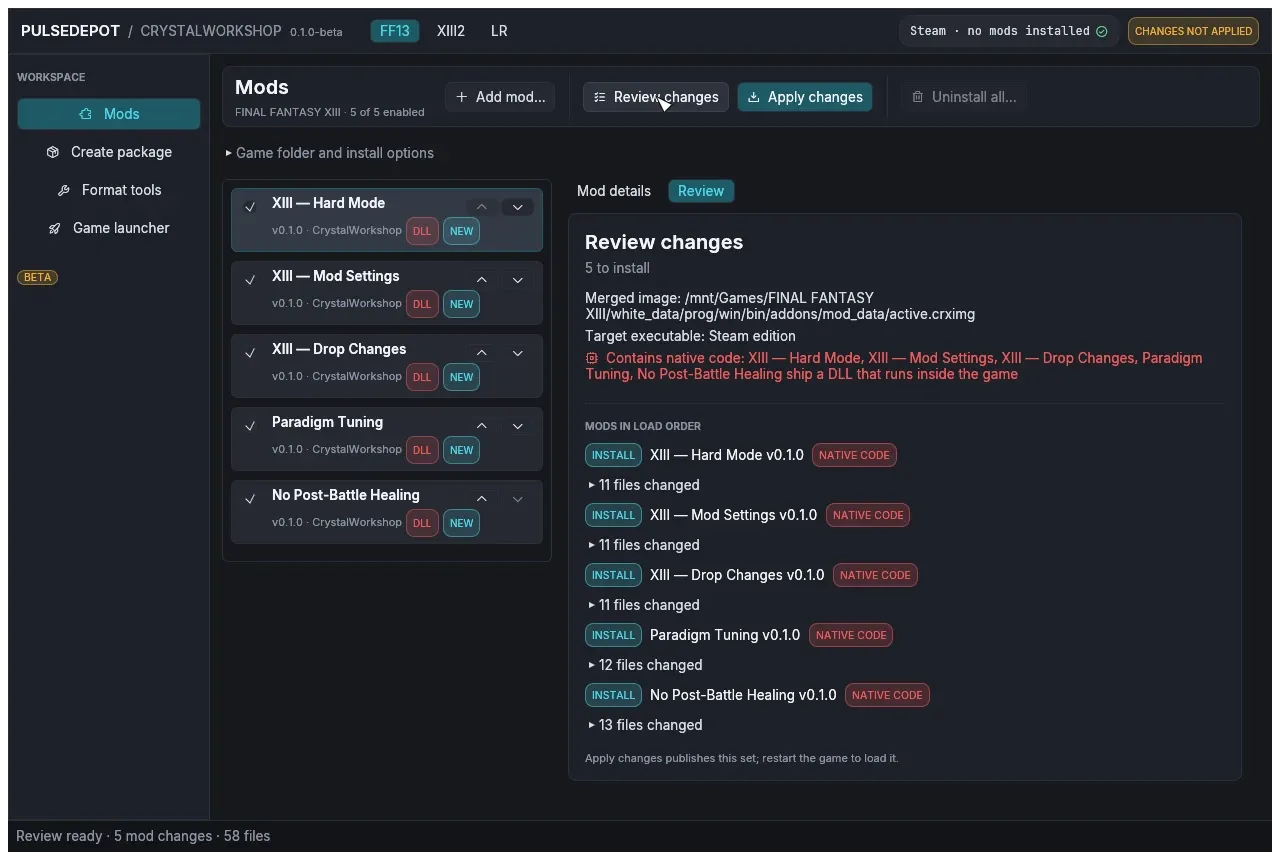
The review shows:
- how many mods it will install, update, downgrade, rebuild or remove;
- where the merged image goes and which game executable it targets;
- any memory patches and native code;
- each mod’s changed files, the conflicts and any Crystarium merge.
-
Choose Apply changes. Close the game first. Apply checks again that nothing changed since the review, then installs the set. The status line reports, for example:
- “NovaFix found.” or “NovaFix not found.”;
- “Installed Crux as …\Crux.dll (SHA-256 verified).” or “Crux is up to date”;
- “Applied: N mod(s) installed. Restart the game to load the new set.”
-
Start the game.
What Apply writes
Section titled “What Apply writes”-
The merged image
active.crximggoes in Crux’s mod folder:modRootfromCrux.ini, if one is set;- otherwise
addons/mod_databeside the game executable, if that folder exists; - otherwise
<game folder>/mod_data.
-
PulseDepot’s own state goes in
<game folder>/ff13_studio/nova/<game>/: the installed mod list (bundle.json), the installed mods and backups of any image PulseDepot did not make. -
Crux is installed as one of:
Crux.dllin the NovaFixaddonsfolder. For XIII:white_data\prog\win\bin\addons\; for XIII-2:alba_data\prog\win\bin\addons\.version.dllbeside the game executable. For XIII:white_data\prog\win\bin\; for XIII-2:alba_data\prog\win\bin\; for LR: the game folder.
Installing one build removes the other, so only one Crux runs.
-
Saves are never read or written. A mod’s settings live in Crux’s host storage (
mod-state.datin the mod folder), keyed by save slot.
When Apply refuses
Section titled “When Apply refuses”Apply stops before writing anything in these cases:
- “Crux not installed: … does not match … extract the whole PulseDepot zip again.” A Crux DLL beside PulseDepot is missing or altered. Extract the package again.
- “… version.dll belongs to another program (it is not Crux).” Another
tool, such as an ASI loader, owns
version.dll. PulseDepot never replaces it. Remove that file yourself, or choose NovaFix addon (Crux.dll) under Crux host. - “installed mod set changed since review; review again”. The installed set changed since you reviewed. Review again.
Running the game
Section titled “Running the game”-
Start the game from Steam as usual, or open Game launcher in PulseDepot and choose Launch with Steam. The launcher runs
steam -applaunch <app id>with the resolution, fullscreen, voice, shadow, MSAA and button options shown there. LR has no display options. On Windows without a knownsteam.exe, PulseDepot opens asteam://rungameidlink instead, and these options do not apply.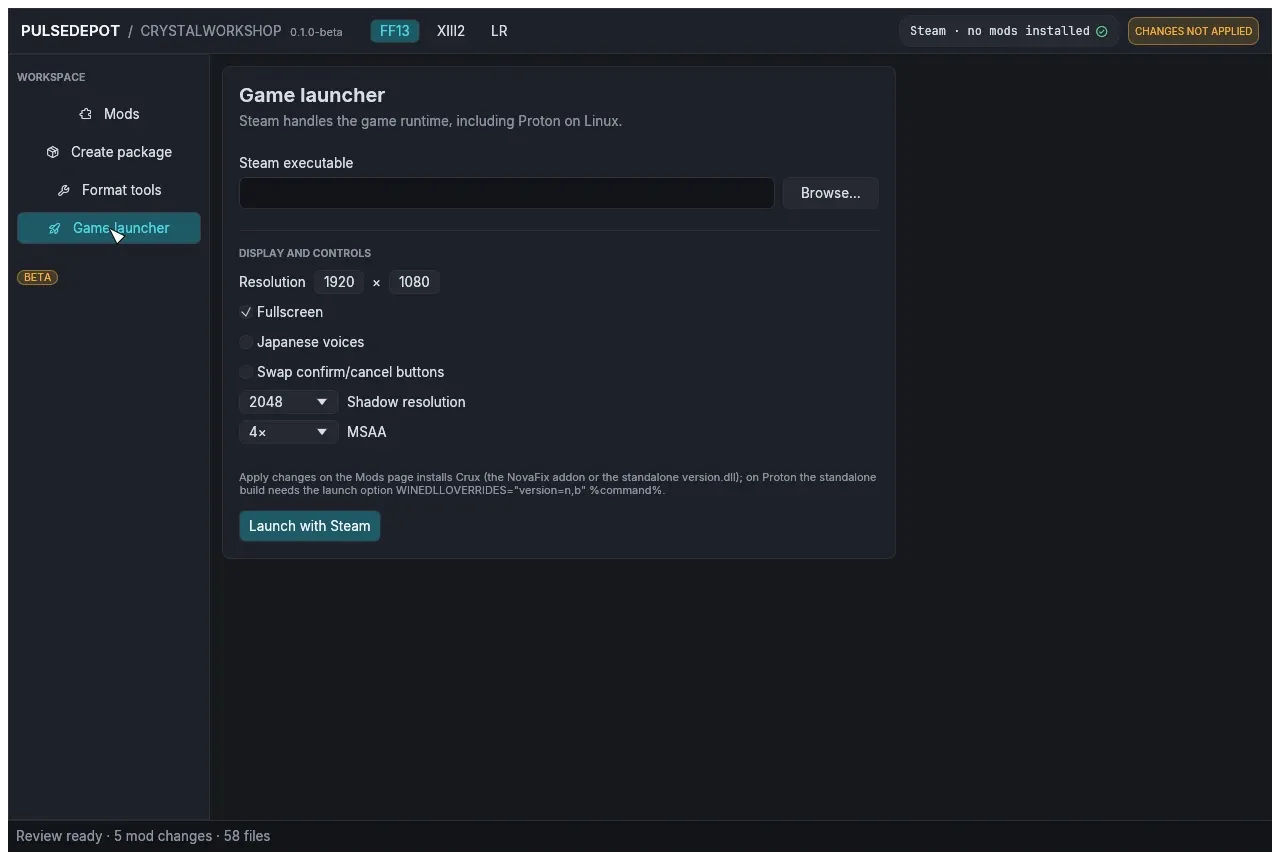
-
Restart the game after every Apply.
-
With the standalone Crux under Proton, keep
WINEDLLOVERRIDES="version=n,b" %command%in the launch options.
Other pages
Section titled “Other pages”-
Create package builds a CrystalWorkshop Shard from a folder of changed files: Nova Chrysalia-style
Data/,EN-Data/,JP-Data/, NCCP code patches, or an external installer, plus metadata and artwork. It compares the folder with your own game files, so it needs the game folder. Most authors should build shards in CrystalWorkshop instead.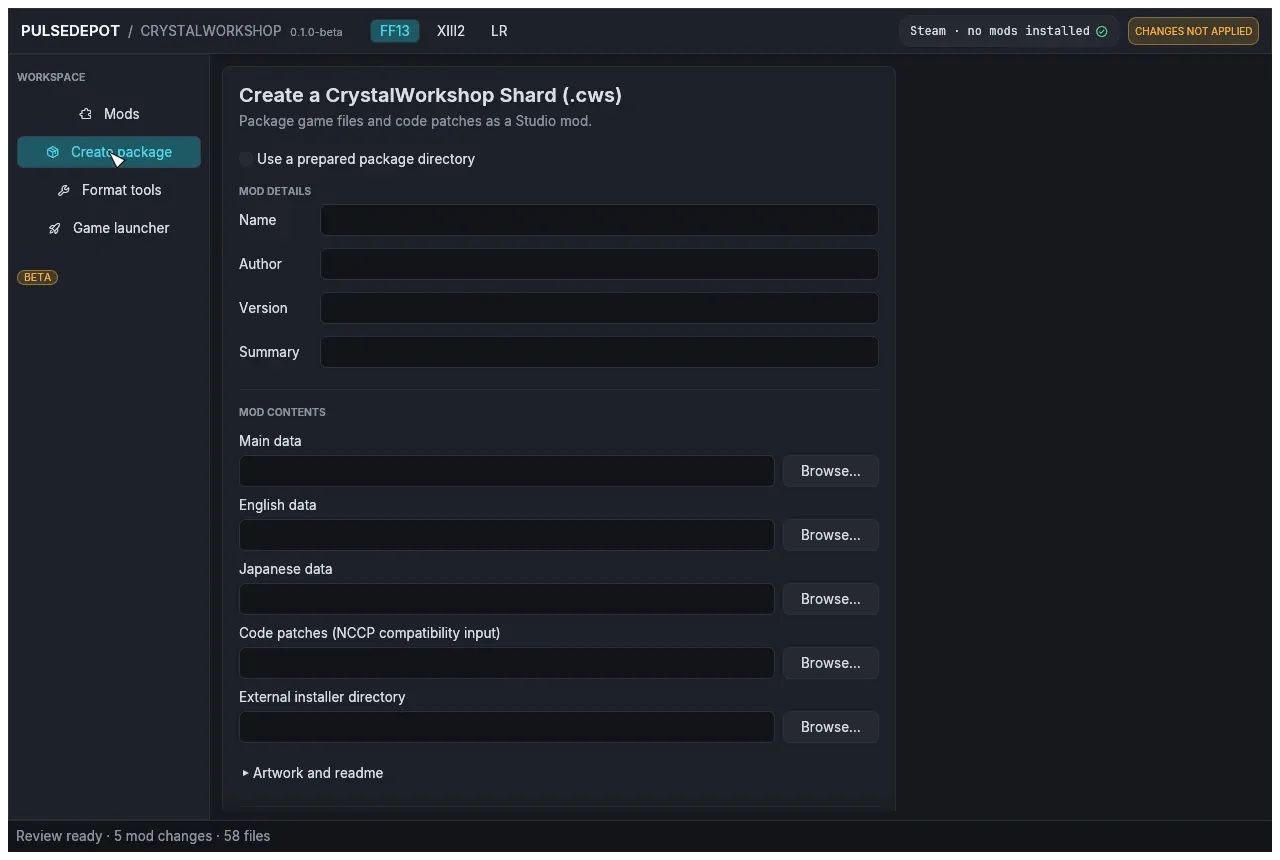
-
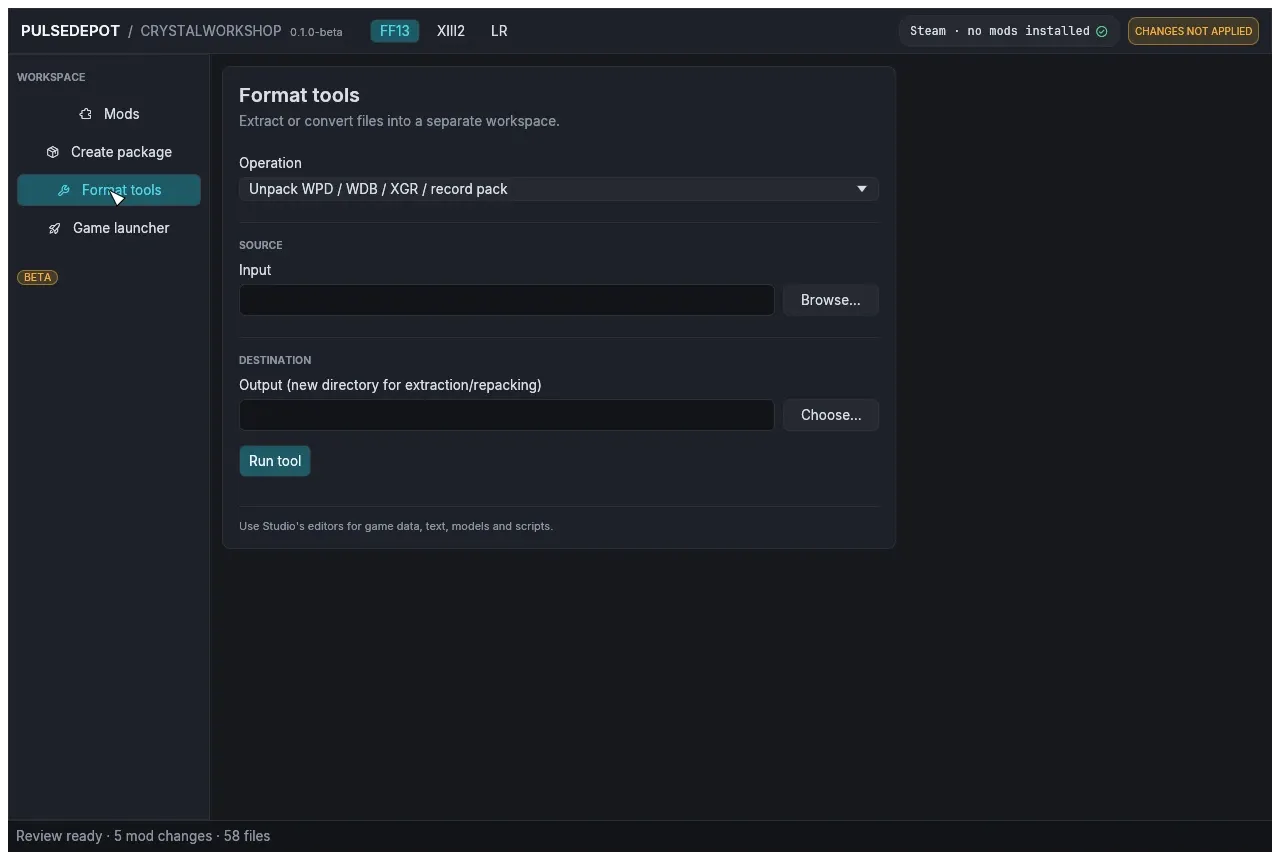
Format tools extracts or converts single files into a separate workspace and never writes into the game. It handles:
- WPD / WDB / XGR / record packs;
- ZTR ↔ JSON or Nova TXT;
- filelists;
- White archives;
- TRB/IMGB;
- SCD ↔ Ogg/WAV;
- WDB ↔
.xlsxor SQLite.
-
The XIII2 tab keeps its own list. The example below shows the XIII-2 UI Scale shard.
Uninstalling
Section titled “Uninstalling”- One mod: untick it (or choose Remove from library), then Review changes and Apply changes.
- Every mod: choose Uninstall all…, then Apply changes. This
removes
active.crximgand keeps your list, so you can apply it again later. - Crux itself: PulseDepot does not remove Crux. After uninstalling the
mods, delete
addons\Crux.dll, or theversion.dllbeside the game executable, by hand. Then remove theWINEDLLOVERRIDESlaunch option on Linux. - All PulseDepot state: delete
<game folder>\ff13_studio\nova\(or the wholeff13_studiofolder if you do not use CrystalWorkshop) and theactive.crximgthat Apply wrote. - PulseDepot itself: delete its folder. It installs nothing else.
Your saves are untouched at every step. PulseDepot and Crux never read or write save files.
Troubleshooting
Section titled “Troubleshooting”| Problem | What to do |
|---|---|
| SmartScreen blocks the start | The build is not signed. Choose More info, then Run anyway (see Install on Windows). |
| The window closes at start with a graphics (wgpu) error | Start PulseDepot from a terminal with WGPU_BACKEND=vulkan (or gl) set. |
| Mods do not show up in game | Check that Crux.jsonl exists in the addons folder beside the game executable (both builds log there). No log means Crux did not load: check the launch option on Proton (standalone build) or the NovaFix install (addon build). A log means it loaded: read the last lines for errors. |
| “Crux not installed: …” | See When Apply refuses. |
| Apply says a file could not be written | Close the game and apply again. |
| Review stops: “Merging script changes needs a JDK 17 or newer …”, or warns that the later mod wins a script file | Install a 64-bit JDK 17+ (see Script mods and Java) and start PulseDepot with Start-PulseDepot.cmd / start-pulsedepot.sh. Check-Java shows what is found. Then review again. |
Crux log:
- The file is
Crux.jsonlin the Crux folder (addons). It rotates toCrux.jsonl.1andCrux.jsonl.2. - Logging is set by
[log] modeinCrux.ini:2(the default) writes the file,1shows a console,3does both. - Attach this log to bug reports, together with PulseDepot’s status line and
BUILD-INFO.json.
Known issues (BETA)
Section titled “Known issues (BETA)”- Not code-signed and no installer.
- Not yet tested on a real Windows PC. It was checked on Linux and under Wine.
- The Linux build is a native x86_64 binary and is not packaged as an AppImage. Its runtime has been tested less than the Windows build’s.
- PulseDepot never removes Crux itself (see Uninstalling).
- LIGHTNING RETURNS appears in the game list, but no LR mod ships with this release.
- Only the ▲/▼ buttons reorder the list.